HP's New 49-Inch Ultrawide Monitor Might Just Fix Your Messy Work-From-Home Setup
Let's be honest: most of our home office setups look like tech Frankenstein's monster. There's the monitor (or two), the wobbly webcam balanced on top, that tangle of cables nobody wants to deal with, maybe a USB hub dangling precariously, and let's not even talk about the speaker situation. HP apparently looked at this chaos and thought, "What if we just... built it all into one thing?" Enter the HP Series 5 Pro 49-inch Conferencing Monitor, and yes, that name is a mouthful. But stick with me here, because this thing might actually be interesting.

The Pop-Up Webcam Nobody Asked For (But Everyone Needs)
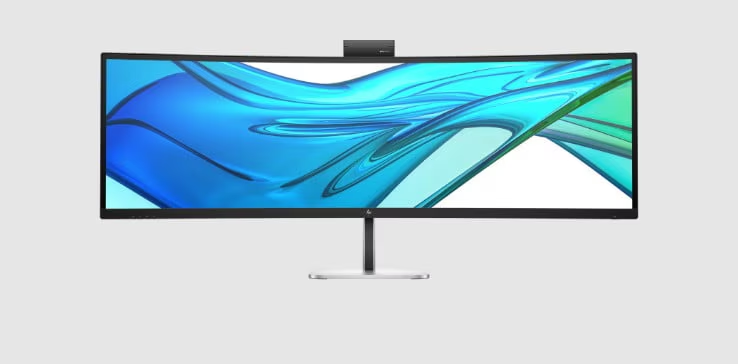
Here's the headline feature: there's a 5-megapixel Poly Studio webcam hiding in the top of this monitor. Push a button, and it pops up like a fancy sports car headlight. Push again, and it retracts completely out of sight.
Is this gimmicky? Maybe a little. Is it also kind of genius? Absolutely.
Think about your current webcam setup. If you're using a laptop, you're probably dealing with that unflattering up-the-nose angle. If you've bought an external webcam, it's either clipped awkwardly to your monitor's top edge or sitting on some makeshift stand. And when you're not using it, there it sits, staring at you like a judgmental little eye.
HP's solution is cleaner. The Poly Studio camera includes Windows Hello support with an IR sensor for facial recognition login, dual microphones with AI-powered noise reduction, and it tilts so you can actually frame yourself properly. When you're done with your Zoom call (it's Zoom Certified and Microsoft Teams Compatible, for what that's worth), it disappears completely.
No tape over the lens. No weird privacy covers. Just press and gone.
It's Really Two Monitors Pretending to Be One
The display itself is massive – 49 inches of curved screen real estate with a 32:9 aspect ratio. In practical terms, that's like putting two 27-inch monitors side by side, except without the annoying bezel gap in the middle.
The resolution clocks in at 5120 x 1440 (DQHD), which sounds fancy but really just means you've got a ton of horizontal space to work with. Spreadsheets? You can see basically the entire thing. Video editing timeline? Stretch it out. Fifteen browser tabs open while you pretend to work? Go wild.
HP actually leaned into this dual-monitor vibe with their Virtual Multiple Display software. Basically, you can tell the monitor to act like it's two (or more) separate displays, even though it's physically one piece of hardware. This is clutch for screen sharing on video calls – nobody wants to see your entire 32:9 desktop stretched awkwardly across their screen. You can share just the "left monitor" portion while keeping your notes or chat windows on the "right monitor" side.
The software also lets you do a 21:9 split, giving you what's essentially a standard 34-inch ultrawide with extra workspace tacked on the side. It's the kind of flexibility that actually makes sense once you start using it.
The Specs That Matter (And The Ones That Don't)
Let's talk numbers, but only the ones you actually care about:
The Good Stuff:
- 1800R curvature: That's the measurement of how curved the screen is. 1800R is pretty aggressive, which helps when you're dealing with this much screen. Your eyes don't have to travel as far, and honestly, it just looks cooler.
- 165Hz refresh rate: Overkill for office work, but it makes everything feel smoother. Scrolling through documents, moving windows around – it all just glides.
- 99% sRGB coverage and 4000:1 contrast ratio: This means colors look accurate and punchy enough for everyday work. It's not going to replace a professional color grading monitor, but for normal humans doing normal work, it's more than fine.
- 400 nits brightness: Bright enough to handle a well-lit office or that annoying afternoon sun that hits your desk at 3 PM.
- TÜV certified HP Eye Ease & Ambient Light Sensor: Basically means HP did something to reduce eye strain during those marathon work sessions, and the sensor adjusts brightness automatically.
The Caveats:
- VA panel with 8-bit color depth: This is where things get nuanced. The VA panel is great for contrast, but it's not the absolute best for color accuracy or viewing angles compared to high-end IPS panels. The 8-bit color depth is perfectly fine for 99% of office tasks but makes it less ideal for serious color-critical work like professional photo editing. For gaming, the 165Hz is nice, but the 5ms response time and 8-bit color mean it's a productivity-first panel, not a competitive gaming one.
Connection Heaven (AKA No More Dongle Hell)
This is where HP clearly talked to actual people who work from home. The connectivity options are legitimately great:
- USB-C with 140W power delivery: Plug in your laptop with one cable, and it charges while displaying. No more hunting for your power brick.
- Additional USB-C ports (front and bottom for easy access)
- Three USB-A ports for your older peripherals that refuse to die
- DisplayPort 1.4 and HDMI 2.1 for traditional connections
- Gigabit Ethernet port: Hardwired internet, right from your monitor. Because sometimes Wi-Fi just isn't cutting it.
- Built-in KVM switch: This one's huge if you're juggling multiple computers (work laptop + personal desktop, for example). One keyboard, one mouse, switch between computers with a button press. No more keeping two sets of peripherals on your desk.
The monitor also supports Picture-by-Picture (PbP) and Picture-in-Picture (PiP), meaning you can display inputs from two different sources simultaneously. Work laptop on the left, personal computer on the right. Or gaming console in a small window while you "work." I'm not judging.
The Audio Situation
HP included speakers, and according to the official specs, it's a surprisingly robust setup: two 3W woofers and two 5W tweeters with a down-firing design. They're built into the monitor, which means they exist and produce sound.
Will they blow you away? Probably not. Are they better than the tinny garbage in most monitors? Yeah, actually. Will you still probably use headphones or external speakers for music and important video calls? Almost definitely.
But here's the thing – having decent built-in audio means you're not scrambling to find your headphones when a Zoom call pops up unexpectedly. It's backup audio that doesn't make you sound like you're calling from inside a tin can.
The Physical Stuff
At 49 inches, this monitor is not small. You need desk space, and a decent amount of it. HP included a stand that offers:
- Height adjustment: Up to 150mm (about 6 inches) of travel
- Tilt, swivel, and adjustable everything else
- 100mm VESA mount compatibility if you want to go the monitor arm route (which you'll need to be a beefy arm for a display this size)
The 1800R curve means it wraps around your field of view a bit, which sounds weird if you've never used a curved monitor but feels natural once you adjust. Your mileage may vary – some people love curves, others can't stand them.
Who's This Actually For?
HP is clearly targeting the hybrid work crowd, and they're not being subtle about it. Everything about this monitor screams "I have a lot of Zoom meetings and even more browser tabs."
This monitor makes sense if you:
- Work from home regularly and do a lot of video calls
- Currently have (or want) a dual-monitor setup but don't have the desk space
- Deal with multiple computers regularly
- Want to clean up your cable situation
- Value an integrated solution over piecing together multiple components
This monitor doesn't make sense if you:
- Are a serious competitive gamer (the 8-bit color and 5ms response time aren't ideal for that)
- Need professional-grade color accuracy for photo/video work
- Have a tiny desk (seriously, measure first)
- Prefer multiple physically separate displays over one giant one
- Are on a tight budget
The Price Question
Here's where things get a little fuzzy. HP has been tight-lipped about the final price, but early reports suggest they are targeting a price around $1,300 in the United States. For international markets, this translates to approximately:
- European Union: Around €1,200 to €1,400 (depending on VAT and regional pricing)
- India: Estimated ₹1,07,000 to ₹1,25,000 (factoring in import duties and local taxes)
Consider what you'd pay separately:
- Decent 49-inch ultrawide: $700-1000
- Quality webcam: $100-200
- KVM switch: $50-150
- USB-C dock: $100-300
Suddenly a price in that ballpark for everything integrated into one package doesn't seem quite so steep. Plus, there's the EPEAT registration and ENERGY STAR certification, which means it meets environmental standards (and might save you a bit on your power bill). We'll know for sure closer to its expected November launch.
The Bottom Line
Is this the most exciting monitor announcement ever? No. Will it change the world? Also no.
But here's what it will do: it'll make your work-from-home setup cleaner, simpler, and more functional. One cable to your laptop. One power button to turn everything on (HP's Single Power On feature). One massive display instead of two separate monitors with a bezel between them. And a webcam that doesn't look like an afterthought clipped to your screen.
HP isn't trying to revolutionize anything here. They're solving real problems that real remote workers actually have. The pop-up webcam isn't gimmicky – it's genuinely clever. The virtual display software addresses a legitimate pain point. The connectivity options show someone at HP actually thought about how people use these things.
If you're serious about your home office setup and tired of the cable spaghetti and peripheral juggling, the HP Series 5 Pro deserves a look when it launches later this year. It won't make your Zoom meetings more interesting, but at least you'll look good on them.
Quick Specs Rundown:
- 49-inch curved display (1800R)
- 5120 x 1440 resolution, 32:9 aspect ratio
- 165Hz refresh rate, VA panel (8-bit color depth)
- Pop-up 5MP Poly Studio webcam with Windows Hello
- 99% sRGB, 400 nits brightness, 4000:1 contrast
- USB-C (140W), DisplayPort, HDMI, Ethernet, multiple USB ports
- Built-in KVM, PbP/PiP support
- Integrated speakers (2x 3W woofers + 2x 5W tweeters) with AI noise reduction mics
- TÜV Eye Ease certified, Ambient Light Sensor
- EPEAT and ENERGY STAR certified
- Expected launch: November 2024
- Expected price: Rumored to be around $1,300
Now if you'll excuse me, I need to go measure my desk to see if I have room for one of these things. 😄